Using Copilot to Unlock Enterprise AI: From Reducing Risk to Super-Powering Users
Copilot is everywhere. Should your organization be using it?
Like a Starbucks on every corner, Microsoft Copilot has become a fixture brand in the Microsoft 365 ecosystem. If you’re an enterprise leader, you’ve likely asked:
“Do we let our employees use Copilot?”
It's an important question that’s worth exploring. Rolling out enterprise generative AI tools will introduce new risks, but not giving users an enterprise-approved option can also be risky. You’ll likely want to ask yourself:
What kind of productivity or quality improvements do we expect from the use of generative AI tools? Are the Copilot features that have been recently included with your Microsoft 365 license enough? When does it make sense to upgrade users to a paid version of Copilot?
This article breaks down what you get today, and why upgrading to a paid version could be a good strategic move for your organization.
Copilot included with Microsoft 365: What you actually get
In September 2025, Microsoft began offering Copilot Chat as part of Microsoft 365 business and enterprise licenses.
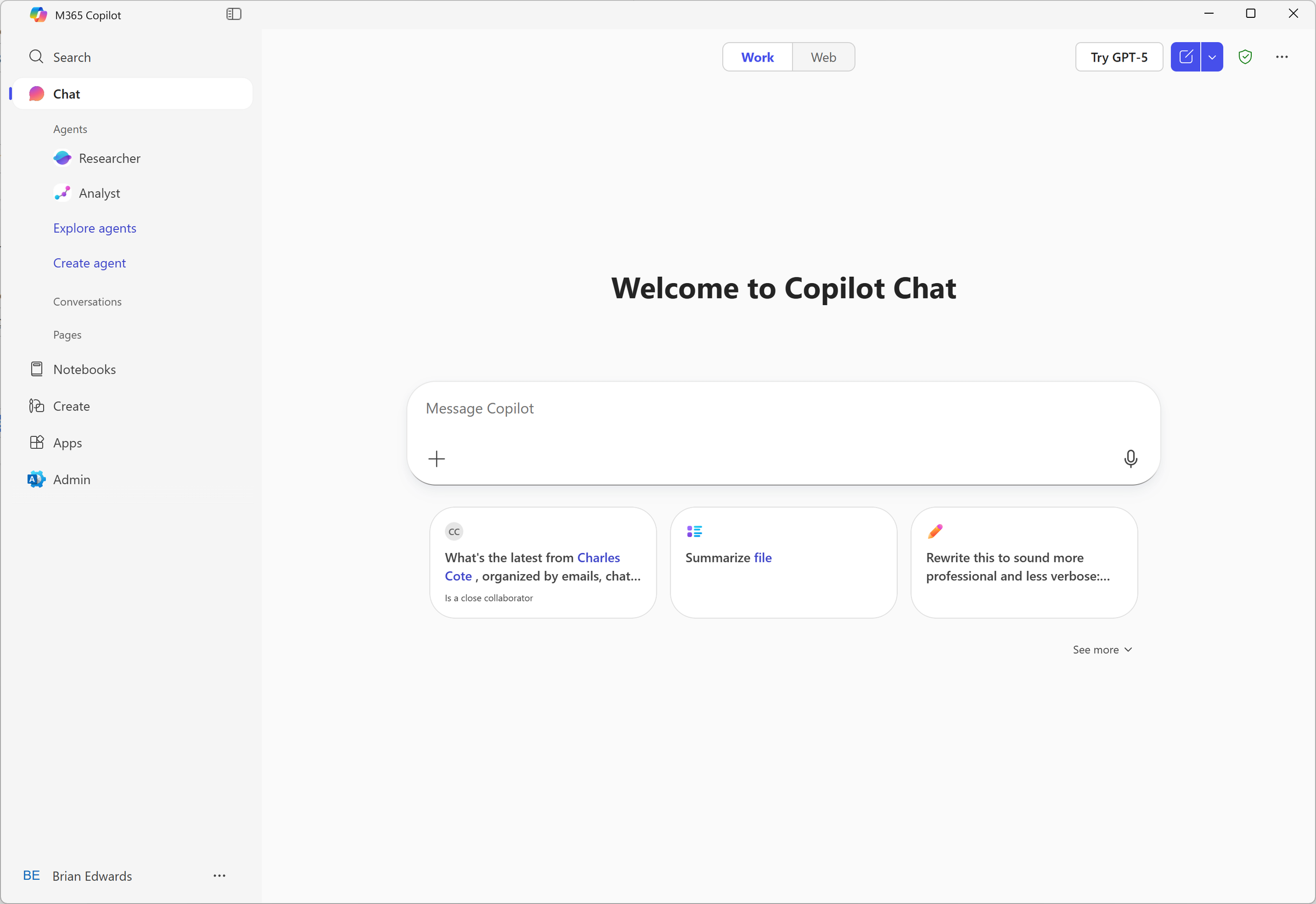
Business M365 users now get access to advanced large language models through Copilot Chat.
When enabled by tenant administrator, users can access Copilot Chat through the M365 Copilot app or at https://m365copilot.com. This access provides:
Access to Large Language Models (LLMs) such as OpenAI GPT-4o — without additional cost.
Secure processing in Microsoft’s data centers. Microsoft’s use of AI is separate from OpenAI’s own implementation.
Enterprise-grade data protection, including encryption, GDPR compliance, and no model training on your data.
Responsible AI safeguards which help prevent harmful content.
IP indemnification guarantees from Microsoft.
This “included” Copilot experience gives employees a safe way to use generative AI features without resorting to public tools. This makes enabling it more than convenience—it meaningfully reduces risk.

Learn more about Microsoft’s enterprise data protection, here. It’s the small green shield on the top right!
Why you should enable Copilot chat for your organization
AI adoption is accelerating at an unprecedented pace. According to Forbes, 66% of consumers now use AI regularly for personal tasks. Without secure enterprise options, employees often turn to public tools like ChatGPT or Gemini, creating risks such as:
Data loss from sharing sensitive content
IP infringement from generated outputs
Exposure to harmful or inaccurate content
Blocking employee access to AI tools rarely works. The proliferation of AI capabilities make it impossible to entirely restrict the use of current and future options. Enabling Copilot Chat as part of your Microsoft 365 environment gives employees a safe, compliant, and enterprise-ready alternative which helps reduce data loss risk while also meeting user demand for AI tools.
For many organizations, the included version of Copilot will be enough. For others, a paid version may unlock further productivity.
Top reasons to upgrade to paid Copilot
Once you’ve explored the foundational features of Copilot Chat, you may wonder: Why should I upgrade to paid Copilot?
Here’s why enterprises should consider it:
(1) Priority access to high-performance models

Paid Copilot ensures your users get priority access to the latest and most capable models, reducing latency and improving response quality. This matters for teams handling complex tasks like financial modelling or legal drafting.
(2) Corporate content grounding
When you pay for a Copilot license, Copilot will began to search and reference your organization’s SharePoint, OneDrive, and Teams content to include in its responses. Your Copilot answers will no longer be generic, and now contextualized with your email, calendars, policies, templates, and other M365 content.
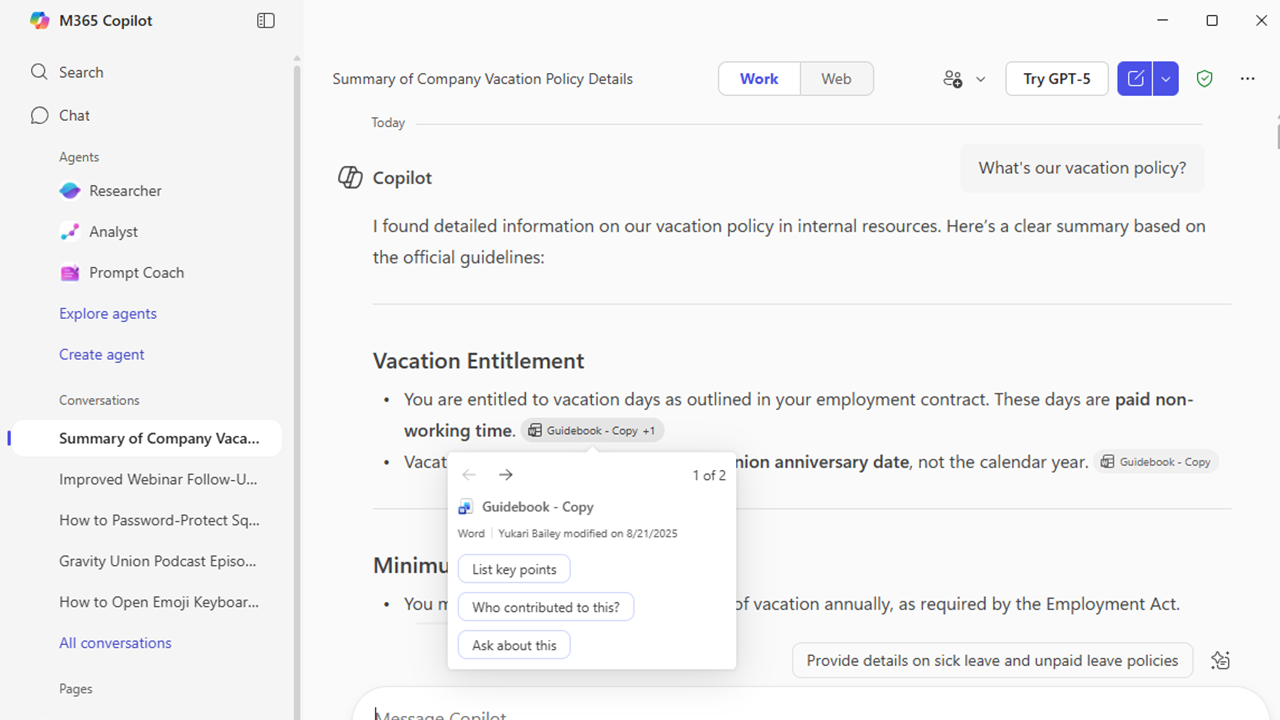
A prompt asking about Gravity Union’s vacation policy provides an answer supported by our internal Guidebook documentation.
(3) Deep integration with M365 Apps
While users with a free version of Copilot can use it alongside mail and documents, the paid version of Copilot breaths new productivity into the M365 apps you likely use every day. Word drafts reports based on your content, Excel analyzes trends, suggests formulas and takes over formatting, and PowerPoint creates presentations—all with natural language prompts. This integration, throughout the M365 suite, may save hours of manual work within these applications.
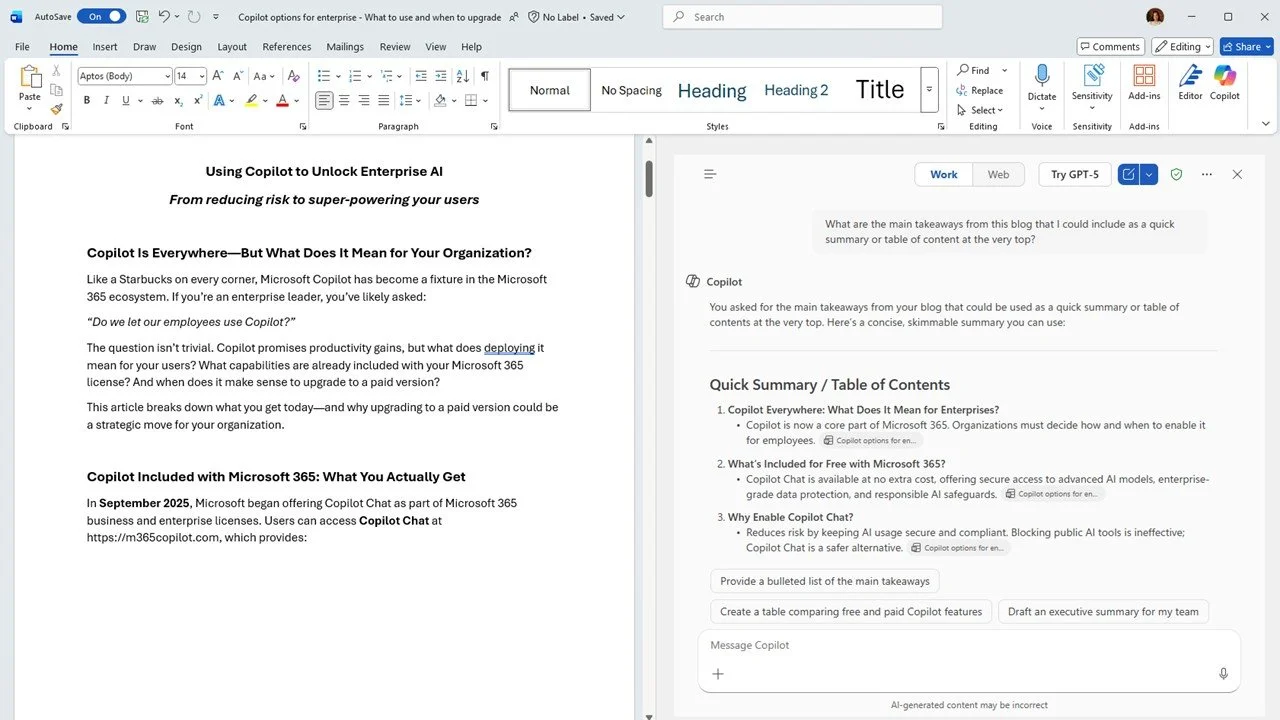
An example of Copilot within Word (on the right side of the image), helping to summarize this very blog.
(4) Advanced enterprise controls
While both versions of Copilot can be governed with tools such as Microsoft Purview, the paid Copilot license offers more granular admin controls, usage analytics, and compliance features. When you pay for a Copilot license, you’ll also get access to advanced tenant tooling, such as Microsoft SharePoint Access Management. These advanced enterprise features help you understand your Copilot use, drive productivity, and improve your ability to govern AI risk.
(5) Copilot studio for custom agents
While all users can build custom Copilot agents, paid Copilot users can build agents that leverage corporate content. You’ll be able to create an HR bot that answers policy questions or a finance bot that automates reporting of an enterprise finance system. In addition, paid users can leverage Copilot Studio to build complex agents with minimal code at no additional cost.
(6) Specialized researcher and analyst models
The M365 Copilot license includes access to models that go beyond text generation. These models perform reasoning, data synthesis, and trend analysis. Paid users not only have access to more models, they get priority access to the most advanced model processing. These models are perfect for R&D teams, analysts, and strategists looking to reduce the effort and time it takes to build rich, comprehensive insights and reports.
(7) Future-proofing your AI strategy
And finally, Microsoft continuously evolves Copilot with new features and integrations. Paid users can stay ahead with early access to innovations, ensuring your organization remains competitive.
At a glance table
| Feature | M365 alone | Additional M365 Copilot license |
|---|---|---|
| Access to advanced models (such as ChatGPT 4o) | Limited | Yes |
| Ability to add documents for processing | Limited | Yes |
| Uses Microsoft Graph to leverage your personal and organization's content | No | Yes |
| Priority for use of advanced processing models | No | Yes |
| Ability to create custom agents | Limited | Yes |
| Ability to add SharePoint sites and other knowledge sources | No | Yes |
| Access to research and analyst models | No | Yes |
| Integrated Copilot for Outlook, Word, Excel, PowerPoint, Teams, and other M365 apps | Very Limited | Yes |
| Meeting transcription and notes for Teams meetings | No | Yes |
| Access to SharePoint Agents | No | Yes |
| Ability to create custom Copilots in Copilot Studio | No | Yes |
| Access to Microsoft SAM, Viva Reports for usage reporting | No | Yes |
Enabling enterprise AI use isn’t optional. It’s a competitive advantage.
The AI genie cannot be put back into the bottle. Organizations that have not yet offered a safe gateway for employees to leverage large language models should consider promoting the use of the Copilot Chat that’s included with Microsoft 365.
For even more productivity gains and to keep the competitive advantage high, organizations should also consider paid versions for employees who:
Create new content — such as writing or editing articles, presentations or reports, organizing content for large groups of people, or drafting and reviewing presentations
Perform regular administrative functions — such as taking meeting notes, scheduling meetings, coordinating calendars, drafting emails, and managing teams or tasks
Research — such as jobs that involve hypothesizing, exploring competitive content, and forming deep insights or viewpoints on a topic
Analyze data — such as gathering large data sets, creating complex calculations, and pushing tools such as Excel to the limit
Code or application design — such as using low-code tools to build enterprise workflows or coding developers that can use AI to generate code, test and troubleshoot
Organizations that haven’t already done so should also consider that there have been considerable advances in AI specific to operational teams, such as HR, Finance and Accounting, Sales, Customer Support, Project Management and Legal. Microsoft and the partner community are continually releasing features and capabilities that target these groups and bring new productivity and automation to common workforce functions.
Whether you’re exploring the free version of Copilot or ready to roll out Copilot to your entire team, Gravity Union can help you experiment, launch, govern and grow your success with Copilot and Microsoft AI.